
UTM Tracking for Small Businesses: The Marketing Secret You're Probably Not Using (But Should Be)

Overview: Learn what UTM tracking is and why small business owners need it. Simple guide to UTM parameters, tracking links, and finally understanding which marketing efforts actually drive results.

One of the most common mistakes I see small businesses making is not properly tracking or measuring the success of their marketing. Marketing just to say you're doing marketing, like posting a rogue social media post to promote a sale when you haven't posted in weeks, really does tend to be tactical and not necessarily tied to the strategic goals of the business.
So what is there to track, right?
Not to sound like a broken record, but tactical marketing is a waste of your time and money. Strategic marketing is trackable, measurable, something you can look at and say "Oh wow, this is actually helping me reach my business goals. It's almost like this is how it's supposed to work...."
So let's talk about ways you can measure the success of your marketing. More specifically, let's talk about something that sounds technical and boring, but is actually one of the most powerful tools you have for understanding your marketing ROI: UTM tracking.
I know, I know. Your eyes are already glazing over. "UTM" sounds like the name of some school you have no reason to care about, or some weird data jargon.
Wrong.
UTM tracking is actually the difference between knowing which marketing efforts are working and just... hoping for the best. 🤷♀️
And honestly? If you're spending money on marketing without UTM tracking, you're basically throwing darts in the dark and hoping you hit the target.
Let me explain.
What the Heck is UTM Tracking?
UTM stands for "Urchin Tracking Module" (yes, really - it's named after the company Google acquired). But forget that weird name for a second.
Here's what UTM tracking actually does:
It's a simple bit of code you add to the end of a URL that tells you exactly where your website traffic is coming from and what prompted someone to click.
Think of it like this: Imagine if every person who walked into your store wore a name tag that said:
Where they heard about you
What specific ad or post made them come in
Which campaign brought them there
That's essentially what UTM tracking does for your website.
Without it, your analytics just shows you: "Someone came from social media."
With it, your analytics shows you: "Someone came from that specific Instagram post you made about your summer sale on June 15th."
Big difference, right?
Why Small Business Owners Need UTM Tracking
Here's the reality I see with most small business owners: They're posting on social media, running ads, sending emails, maybe doing some local partnerships... and they have NO IDEA which of these efforts actually drives customers.
They might look at their Google Analytics and see:
"We got 200 visitors from social media this month"
"Email sent us 50 visitors"
"We had 100 visitors from referral sources"
But they can't answer these critical questions:
Which social media post drove those 200 visitors?
Did that specific email campaign about the summer sale work better than the spring one?
Which partnership is actually sending us traffic?
Are people clicking on the link in our Instagram bio or the one in our Facebook posts?
Is anyone coming to the website from those QR codes we keep throwing out everywhere?
Without UTM tracking, you're making marketing decisions based on guesses, not data. And when budgets are tight (and aren't they always?), you literally cannot afford to waste money on marketing that doesn't work.
Real-World Example: The Email Campaign Mystery
One of my clients was frustrated because they were sending monthly email newsletters but had no idea if anyone was actually clicking through to their website. Their analytics showed: "You got 45 visitors from email this month."
But they'd sent FOUR different emails that month:
Weekly tips email
Product announcement
Sale notification
Event invitation
Which one drove those 45 visitors? They had no clue.
After we set up UTM tracking, we discovered:
The sale notification drove 38 of those 45 visitors
The weekly tips email brought 5 visitors
The other two emails? A combined total of 2 visitors.
This changed everything.
Now they knew to focus on promotional emails over educational content (for their specific audience, yours might be different!). They stopped wasting time on emails that didn't drive traffic and doubled down on what actually worked.
That's the power of UTM tracking.
What UTM Parameters Actually Track
UTM tracking uses five different parameters (pieces of information) you can add to your links. Don't worry, you don't have to use all five. Most small businesses focus on three.

The Big Three (Use These)
1. Source (utm_source) Where is the traffic coming from?
facebook
instagram
newsletter
google
Example: You want to know if traffic came from Facebook vs. Instagram
2. Medium (utm_medium) What type of marketing is it?
social
email
cpc (cost-per-click/paid ads)
referral
Example: You want to distinguish between organic social posts and paid ads
3. Campaign (utm_campaign) What specific campaign or promotion is this?
summer-sale-2025
new-product-launch
holiday-promo
Example: You want to know which sale or promotion drove traffic
The Nice-to-Haves (Optional but Useful)
4. Content (utm_content) Useful for A/B testing or differentiating similar links
blue-button
text-link
header-image
Example: Testing which call-to-action button performs better
5. Term (utm_term) Originally for tracking paid search keywords (most small businesses won't use this)
UTM Tracking Starter Kit
Now let's quickly cover how to start UTM tracking in your business. I'm going to make this as easy as possible because the technical stuff scares people away from using one of the most valuable marketing tools out there.
Step 1: Use Google's Free UTM Builder
First off, don't try to write UTM codes by hand. Use Google's Campaign URL Builder: https://ga-dev-tools.google/campaign-url-builder/ It's free, it's simple, and it does the work for you.
Step 2: Fill in the Blanks
For each link you want to track, answer these questions:
Website URL: Where are you sending people?
Campaign Source: Where will this link appear?
Example: facebook, instagram, newsletter, google
Campaign Medium: What type of marketing is this?
Example: social, email, cpc, referral
Campaign Name: What campaign or promotion is this part of?
Example: summer-sale-2025, new-product-launch
The tool generates your tracked link automatically.
Let's say you're posting on Instagram about your summer sale.
Your normal link might look like:
Your UTM-tracked link would look like:
Yes, it's longer. But that extra code tells you SO much more.
Step 3: Use Your UTM Links Everywhere
Now use these tracked links instead of regular links:
Social media posts
Email campaigns
Paid ads
Guest blog posts
Partner websites
Print materials with QR codes
Digital flyers
Basically: anywhere you're directing people to your website.
Step 4: Check Your Results in Google Analytics
In Google Analytics (GA4), go to: Reports → Acquisition → Traffic Acquisition
You'll see all your sources, mediums, and campaigns listed with exact visitor numbers and behavior data.
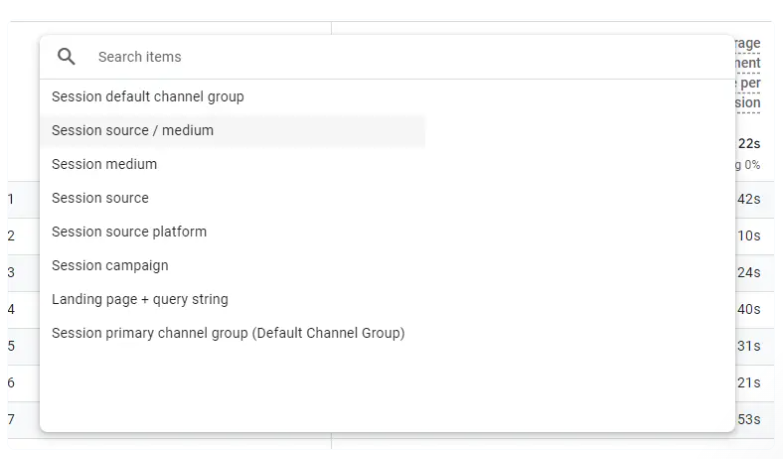
Now you can finally answer:
Which social platform drives the most traffic?
Which email campaigns get the most clicks?
Which partnerships are actually valuable?
Which ads are worth the money?
You're already doing the marketing work. UTM tracking just helps you understand if it's actually working.
That's not optional. That's essential.
Especially when budgets are tight and every marketing dollar needs to count.
Need Help Getting Strategic with Your Marketing Data?
If you're overwhelmed by the idea of tracking all this data (or you're tracking it but don't know what to DO with it), that's exactly what we help with.
Our Strategic Marketing Audits include:
Analysis of your current traffic sources and what's actually working
UTM tracking setup and strategy
Monthly analytics dashboards that turn data into actionable insights
Strategic recommendations based on YOUR specific data
We help you move from "I think this is working?" to "I KNOW this is working, and here's the data to prove it."


